Introducing OH Router, a command-line supervisor for Claude Code and Codex
OH Router is a command-line tool that runs Claude Code and Codex sessions in the background, shows which ones are waiting for you and delivers your next prompt when a session is ready for it. A session keeps running after you close the terminal that started it. OH Router runs on Apple Silicon Macs and on Linux, on x86_64 and arm64.
Say you start a long refactor on a build server before you log off. Over plain SSH you would keep it alive in tmux and reattach later to find out what happened. With OH Router, oh-router ps tells you the next morning whether the session finished, stopped at a permission prompt or is still working.
Install it and start a session
$ curl -fsSL https://ohrouter.com/install.sh | sh
$ cd ~/src/my-app
$ oh-router claude --tier opus --effort high "Add tests for the CSV export"
$ oh-router ps
The install script puts oh-router, ohd and oh-holder in ~/.local/bin and checks the archive against the SHA-256 that release.json lists for your platform before unpacking it. On a Mac you can install with Homebrew instead: brew install hraness/tap/oh-router.
oh-router claude starts Claude Code in the current folder, and oh-router codex starts Codex. Pick the model with --tier: opus or fable for Claude Code, sol or astra for Codex. Set --effort to low, medium, high or max. The first session command also starts ohd, the supervisor that tracks every session, if it is not running yet.
For Claude Code, run oh-router daemon setup-hooks --write once. It adds hooks so ohd hears about each prompt, tool call, notification and finished turn as it happens, and it keeps any status line command you already use.
Check on a session and steer it
oh-router ps lists your sessions on this machine and on any machine you have paired, with the state of each one. oh-router inspect shows a session’s state, its recent turns and what is on its screen. To send the next instruction, use oh-router steer:
$ oh-router inspect term_01a2b3c4d5e6
$ oh-router steer term_01a2b3c4d5e6 --mode queue "Fix the failing tests"
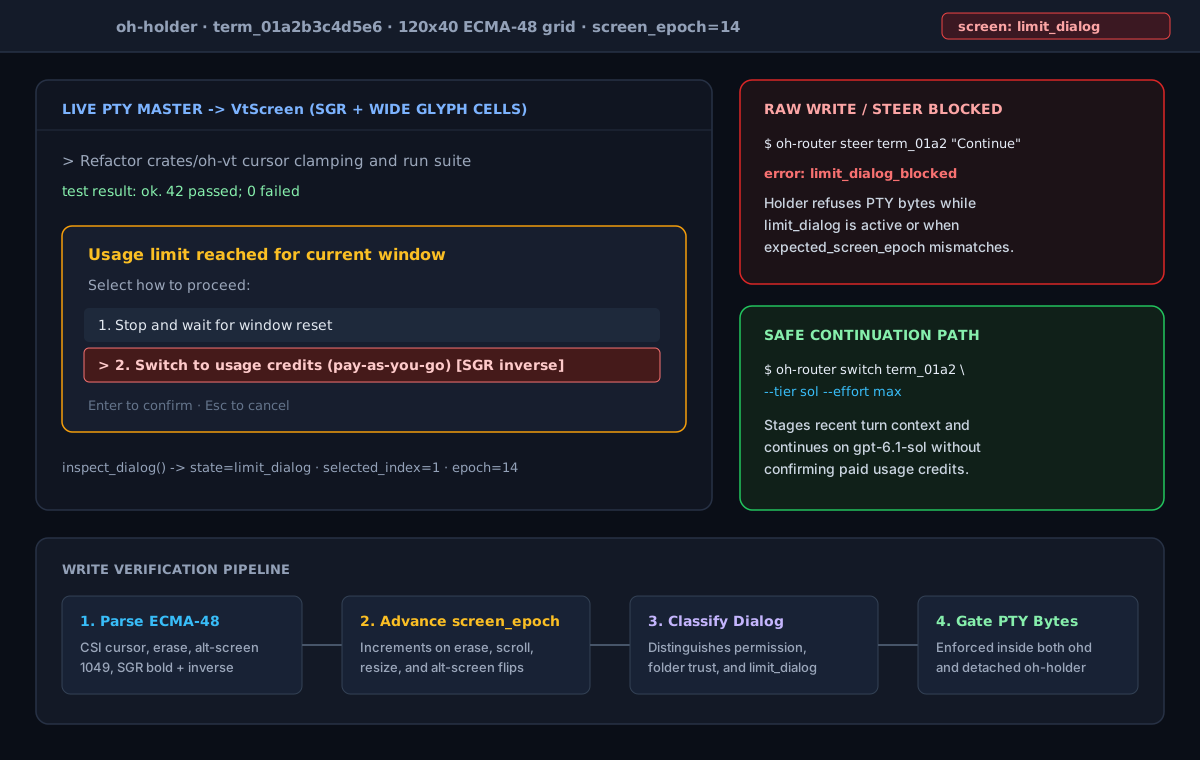
OH Router reads each session’s terminal as the screen you would see, rather than as a stream of bytes. A queued instruction goes in when the agent is back at an empty prompt. While a permission prompt is open, it waits until you answer with oh-router action term_01a2b3c4d5e6 approve or deny. OH Router refuses to type into a dialog that offers paid usage credits or a plan upgrade, so a queued prompt cannot accept a charge for you. The screen guard guide lists each state a session can be in.
Pair a second machine
To reach sessions on a build server from your laptop, install OH Router on both. On the server, with cloudflared installed, start a tunnel:
$ oh-router devices tunnel-start --quickA quick tunnel gets a temporary trycloudflare.com address and needs no Cloudflare account. For a permanent hostname, create a named tunnel in your Cloudflare account. The tunnels guide covers both, along with an SSH config entry for the server. Then register the server on your laptop with oh-router devices add-remote, giving it the tunnel address and the server’s bridge token. The token travels only in an Authorization header, and it lets your laptop read and steer sessions but not open a shell.
Work from one task queue
OH Router can connect to a @vercel/board server and run a worker that claims ready tasks from the channels you choose. --mode local starts a board on your own machine. To share one queue between machines, connect each of them to the same hosted board with --mode vercel and the board’s address in --url.
$ oh-router board connect --mode local --channel dev
$ oh-router worker --loop --channel dev
The worker starts a session for each task it claims and renews the claim’s lease while the session runs, so a worker on another machine skips that task. The board guide covers both modes, routing labels and threads.
Give your coding agents the same view
Coding agents can drive OH Router too. The OH Router skill package teaches Claude Code, Codex and Cursor to read oh-router ps --json and oh-router inspect <id> --json before they steer another session, so their prompts pass the same screen check as yours.
On a Mac, OH shows the same sessions in a window, with notifications for the ones that need you. It includes OH Router, so you can start from either one.